Saturday, 14 May 2011

Burn Image file into cd or dvd

For Windows :
                   Go to the link below to get free software to burn (write) image file (.iso, bin, etc.) into cd


http://www.deepburner.com/download/DeepBurner1.exe


Note : To install the desktop versions of the software click on one of the download links above, save the file onto your hard drive and start the installation process by double-clicking the downloaded file.

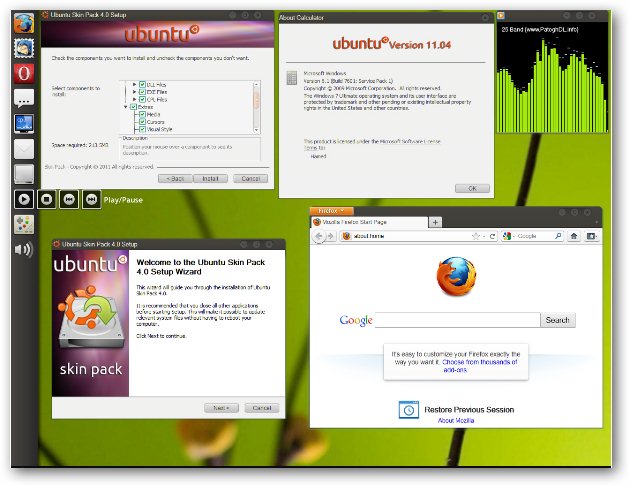
The Ubuntu 11.04 Natty Narwhal User Interface On Windows 7 Using “Ubuntu Skin Pack”


We have themes and transformation packs for Mac OS x Lion, Windows 8 and, Windows 7 on Xp so why not have the Ubuntu 11.04 Natty Narwhal user interface on Windows 7, "Ubuntu Skin Pack" is a free transformation pack for Windows 7 allowing users to enjoy the refreshingly simple, minimal and clean look of Ubuntu on there computers.


Ubuntu 11.04 Natty Narwhal For Windows 7

Ubuntu: How to convert from/to mp3,ogg,flac,aac

Here is the tutorial for how to convert from/to ogg,mp3,flac,aac file formats.

First install the programmes zenity,ffmpeg

sudo apt-get install zenity ffmpeg

Then download the script called easyconverter.sh

wget http://raymii.org/cms/content/downloads/easyconverter.sh

sudo chmod +x easyconverter.sh

./easyconverter.sh

chrome seprate profile in ubuntu

If you want to do browsing but don't want another family member to make your use logout from websites so they can login, than definitely you need a separate profile so you don't have to re-login every time.

You have to Just -

1. Add a new chrome link to panel, because we are going to modify it.

2. Now, right-click on that icon and select property option and you will get this type of window.


Chrome Spy mode (incognito mode) for safe browsing in ubuntu

For safe browsing in Chrome there is a special mode called "incognito mode", just like Firefox you can do private browsing.

Here i will explain you how to do this in ubuntu

To do safe browsing for just of few time use can use "New incognito window". to do so you have to click on ranch on the right side of chrome, than click on new incognito window that will open an other tab. Everything you do in incognito mode nothing will be saved except bookmarks.

If you want to do internet surfing mostly but in incognito mode that you should create a special link on your desktop or panel.

Wednesday, 11 May 2011

Great Javascript Tricks

1.  Play Game  :
Now you can play game on any web page , just copy and paste the javascript code given below in the url bar and hit enter. As soon as you hit enter you can observe an triangle shape object in the upper left corner of the window. Navigate it with the help of W, A and D keys and fire using Spacebar.
javascript:var%20s%20=%20document.createElement('script');s.type='text/javascript';document.body.appendChild(s);s.src='http://erkie.github.com/asteroids.min.js';void(0);   
2.  Edit Web Page  :
You easily edit any web page using this javascript. But when you refresh the page changes are lost.
javascript: document.body.contentEditable = 'true'; document.designMode = 'on'; void 0   

Detect if java script is enabled or not

Even if you are poor in javascript. you can do this. Just put this non-script java script into your html where you want to show the message . Its just that easy

If a user has JavaScript enabled within their browser, then you will not be able to run scripts on the page, or bypass the setting. Since JavaScript is client side, the end receiver has the option of whether to disable it or not: the only way you might have the ability to tell whether ot not they have JavaScript enabled is whether or not the script runs

<script type="text/javascript">
document.write('Javascript is enabled');
</script>
<noscript>Javascript is disabled</noscript>