<?xml encoding="utf8" version="1.0"?><!DOCTYPE html PUBLIC "-//W3C//DTD XHTML 1.0 Transitional//EN" "http://www.w3.org/TR/xhtml1/DTD/xhtml1-transitional.dtd">
<html xmlns="http://www.w3.org/1999/xhtml">
<head>
<style type="text/css">
.focus_text {
color:#aaaaaa;
}
</style>
<script language="javascript1.2" type="text/javascript" src="js/jquery.js"></script>
<script language="javascript1.2" type="text/javascript">
$(document).ready(function () {
$('.focus_text').focus(function() {
if ($(this).val() == $(this).attr('title')) {
$(this).val('');
$(this).css({color:'#000000'});
}
});
Monday, 11 July 2011


use this for creating sliding tabbed pages
use this for creating sliding tabbed pages
<!DOCTYPE html PUBLIC "-//W3C//DTD XHTML 1.0 Transitional//EN" "http://www.w3.org/TR/xhtml1/DTD/xhtml1-transitional.dtd">
<html xmlns="http://www.w3.org/1999/xhtml">
<head>
<script type="text/javascript" src="jquery.js" language="javascript1.2"></script>
<script language="javascript1.2" type="text/javascript">
function slideTo(trgt, mLeft) {
$(trgt).parent().find('.active_tab').removeClass('active_tab');
$(trgt).addClass('active_tab');
$('#divTabbedSlider').animate({'margin-left':mLeft}, 500);
}
</script>
<!DOCTYPE html PUBLIC "-//W3C//DTD XHTML 1.0 Transitional//EN" "http://www.w3.org/TR/xhtml1/DTD/xhtml1-transitional.dtd">
<html xmlns="http://www.w3.org/1999/xhtml">
<head>
<script type="text/javascript" src="jquery.js" language="javascript1.2"></script>
<script language="javascript1.2" type="text/javascript">
function slideTo(trgt, mLeft) {
$(trgt).parent().find('.active_tab').removeClass('active_tab');
$(trgt).addClass('active_tab');
$('#divTabbedSlider').animate({'margin-left':mLeft}, 500);
}
</script>
Sunday, 10 July 2011
Use Any Font in HTML with better control


Step 1: Download Cufón
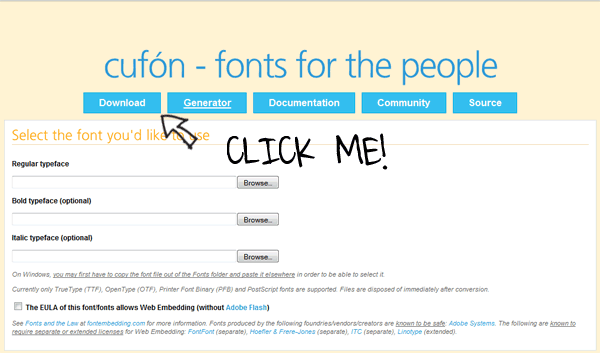
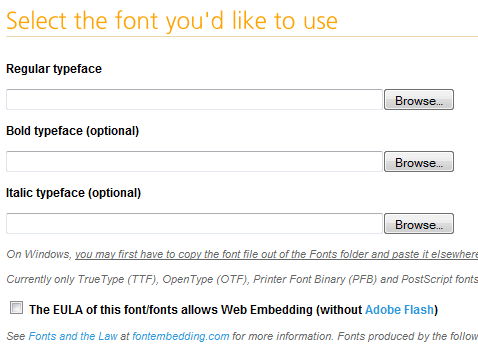
Step 2: Convert a Font
Subscribe to:
Posts (Atom)