Sunday, 20 November 2011

Move Window Buttons Back to the Right in Ubuntu

One of the more controversial changes in the Ubuntu 10.04 beta is the Mac OS-inspired change to have window buttons on the left side. We’ll show you how to move the buttons back to the right.

Before

While the change may or may not persist through to the April 29 release of Ubuntu 10.04, in the beta version the maximize, minimize, and close buttons appear in the top left of a window.


How to move the window buttons

Sunday, 7 August 2011

introduction jquery basic beginners

Introduction

jQuery is one of the many framework provided online to help developers to minimize the time needed to write advance coding. It provides many useful feature to help developers to overcome cross browser issues. Best of all, it is extremely light-weight for optimization! jQuery has a large community and available plugin for different purposes. What jQuery can do for you? Powerful stuff! Check out their plugin made by other developers all over the world!
Since i am also new to jQuery, i believe there will always be new comer entering new technology and feature. So here i am writing this article to introduce some of the basic i learn in jQuery and hope it will help others too. Please bear in mind before we start, jQuery selection will always return you a set of jQuery object which you can use to do a chain operation(chaining is the powerful part of jQuery).


Element Manipulation

Saturday, 23 July 2011

Ethernet not working on ubuntu

No matter which pc or laptop you are running. If you are having problem of ehternet, bluetooth or wireless connection with your pc. Than you are in right place for 100% sure solution.

Just download the latest package from link below and save it to the desktop :

http://linuxwireless.org/download/compat-wireless-2.6/

Now, to compile and install the driver Run these commands in Terminal.


sudo apt-get update
sudo apt-get install build-essential
cd ~/Desktop
tar -xjvf compat-wireless-2.6.tar.bz2
cd compat-wireless*
scripts/driver-select atl1c
make
sudo make install

Now reboot you pc or laptop, Hopefully your ethernet will work automatically when you get in connect with wired network. If not, than run this command from terminal.

sudo modprobe atl1c

Sunday, 17 July 2011

How to disable ubuntu splash screen

I like to see the boot logs of ubuntu like the old style rather a slick splash screen at the boot time.

It is done with just two steps mentioned below

#sudo gedit /etc/default/grub


Find the line GRUB_CMDLINE_LINUX_DEFAULT=”quiet splash” and make it look like
GRUB_CMDLINE_LINUX_DEFAULT=”", then save the file

Now, run

run #sudo update-grub

Thanks for visiting

cover background automatically


just give this style to your component to give a background that will cover background automatically.

{
background: url(images/bg.jpg) no-repeat center center fixed;
        -webkit-background-size: cover;
        -moz-background-size: cover;
        -o-background-size: cover;
        background-size: cover;
}

Using Max & Min width in IE6

Min & Max width are both great tools to have in your design arsenal, but unfortunately they don’t work in IE6, so what do we do?
We usually lock down the width of our site instead of creating the ideal fluid layout we want, sacrificing user experience for
out of date browsers.

Luckily, we can use a short JavaScript command targetting IE to accomplish a nice fluid layout with max & min widths in IE6:

#page-wrap
{
min-width:800px;
max-width:1000px;
width:expression(document.body.clientWidth < 800? "800px" : document.body.clientWidth > 1000? "1000px" : "auto");
}


In the above example, you can see that the smallest width for this page is 800px, and the largest is 1000px; not much of a flex,
but the concept can be applied to any element.

And if you only wanted to use min-width:

#page-wrap
{
min-width:800px;
width:expression(document.body.clientWidth < 800? "800px": "auto" );
}

adn also can try this-one


.with_minheight {
  min-height:550px;
  height:auto !important;
  height:550px;
}

Move window buttons on the left side to the Right

controversial changes in the Ubuntu 10.04 beta is the Mac OS-inspired change to have window buttons on the left side. We’ll show you how to move the buttons back to the right.

How to move the window buttons

We’ll use the graphical program gconf-editor to change this configuration file.

Open terminal by pressing ctrl+Alt+T and run this command

gconf-editor

The configuration editor will popup

Monday, 11 July 2011

form coding tests

<?xml encoding="utf8" version="1.0"?><!DOCTYPE html PUBLIC "-//W3C//DTD XHTML 1.0 Transitional//EN" "http://www.w3.org/TR/xhtml1/DTD/xhtml1-transitional.dtd">
<html xmlns="http://www.w3.org/1999/xhtml">
  <head>
  <style type="text/css">
    .focus_text {
      color:#aaaaaa;
    }
  </style>
  <script language="javascript1.2" type="text/javascript" src="js/jquery.js"></script>
  <script language="javascript1.2" type="text/javascript">
    $(document).ready(function () {
      $('.focus_text').focus(function() {
        if ($(this).val() == $(this).attr('title')) {
          $(this).val('');
      $(this).css({color:'#000000'});
        }
      });

use this for creating sliding tabbed pages

use this for creating sliding tabbed pages


<!DOCTYPE html PUBLIC "-//W3C//DTD XHTML 1.0 Transitional//EN" "http://www.w3.org/TR/xhtml1/DTD/xhtml1-transitional.dtd">
<html xmlns="http://www.w3.org/1999/xhtml">
  <head>
  <script type="text/javascript" src="jquery.js" language="javascript1.2"></script>
  <script language="javascript1.2" type="text/javascript">
    function slideTo(trgt, mLeft) {
      $(trgt).parent().find('.active_tab').removeClass('active_tab');
      $(trgt).addClass('active_tab');

      $('#divTabbedSlider').animate({'margin-left':mLeft}, 500);
    }
  </script>

Sunday, 10 July 2011

Use Any Font in HTML with better control


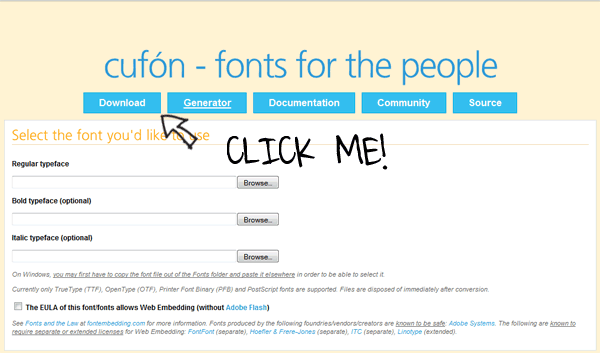
Step 1: Download Cufón

Cufon homepage
Visit Cufón’s website and right-click on the “Download” button at the top. Choose “Save-As” and place it on your desktop.

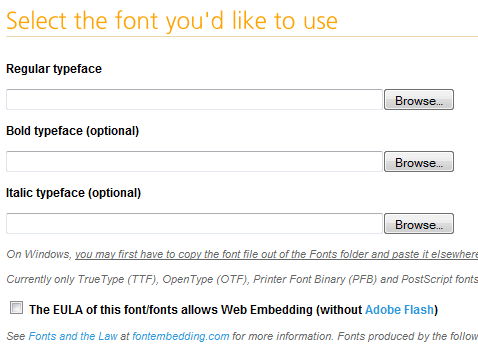
Step 2: Convert a Font

Choose A Font
In order to function, we need to use the font converter utility on the website. Alternatively, you may download the source code and convert your fonts locally. For the purposes of demonstration, I’ve chosen to use an obnoxious font: “Jokerman”. Note – Windows users: you may have to copy the font from your “FONT” folder to the desktop for this to work.

Monday, 4 July 2011

open rar archive files under Linux / UNIX

RAR files are in compressed archive format, if you have downloaded rar files from the Internet, you need to unpack or unrar them (extract rar files).
By default unrar is not part of Linux, FreeBSD or UNIX OSes. You can install unrar command with the help of apt-get or yum command.
See below for:

Install unrar command

Under Debian Linux, you need to type apt-get as follows to install unrar program:

apt-get install unrar

If you are using Fedora core Linux then use yum command as follows (see discussion below):

Import Script, Import CSS, Import PHP

JavaScript:

<script
   type='text/javascript'
   src='directory/file.js'>
</script>
CSS:
<style type='text/css'  media='all'>
   @import 'directory/file.css';
</style>

Icon:

<link
   rel='Shortcut Icon'
   href='directory/file.ico'
   type='image/x-icon'>

PHP:

<?php @ require_once ('directory/file.html'); ?>

For the PHP import, by placing the @ symbol before require_once suppresses any error messages that might be generated in the included PHP file.

JSP:

<%@ include file='jspfile.jspi' %>

And, well, I guess the list can go on and on. You can use Struts Tiles to include other JSP snippets. I am sure that other languages and frameworks have the same functionality.

Sunday, 3 July 2011

record internet radio using vlc

VLC is open source programme, now using for recording a internet radio.

First open a empty text file in terminal

sudo gedit recordint.sh

Now copy and paste the following lines

replace photoshop keyboard shortcuts with gimp

To get keyboard shortcuts in The Gimp that resemble shortcut keys in Photoshop, Create an empty file on desktop and paste the following code in it and same it as "menurc".


After saving file as "menurc". now re-place this file with file named menurc in or whatever version of Gimp you installed.

/home/USERNAME/.gimp-2.7

Thursday, 30 June 2011

best things to do in Ubuntu 11.04 Natty

Posted in Linux distributions - Ubuntu. The final release of Ubuntu Natty Narwhal is out. After you actually get done with the installation, there would likely exist a heap of things you still need to take care of. This post will share some interesting insight and ideas about what you can and should do after a successful installation.

u9
If you have already a previous release of Ubuntu installed and you want to upgrade, then follow our step by step guide to upgrade to ubuntu 11.04 Natty Narwhal

Wednesday, 29 June 2011

Create a MySQL User Account via the Terminal

First, Login to MySQL as an administrator account with:

mysql -u root -p

You will be prompted for your root password before being granted access to the MySQL

Now to check available user accounts on the system. type this command:

SELECT USER,host FROM mysql.USER;

If the user account that you wish to create doesn’t appear in that list
To create a new user account type this command:

CREATE USER 'new-username'@'localhost' IDENTIFIED BY 'password-for-new-account';

this user isn’t linked to any databases yet, but this is simple to rectify with a:

GRANT ALL ON mydatabase.* TO useraccount@localhost

that will grant all rights for the user account to everything held in the mydatabase database.

Tuesday, 28 June 2011

Nice themes for ubuntu 10.04 (Lucid Lynx)


We have already posted some time ago about Nice Ubuntu themes for karmic Users and this is updated for Lucid Lynx users now.

Install bisigi themes in Ubuntu 10.04 (Lucid)


Open the terminal and run the following commands
sudo add-apt-repository ppa:bisigi
sudo aptitude update
sudo aptitude install bisigi-themes

or click on apt://bisigi-themes
If you want to install each theme separately use the following commands

  • AquaDreams:                      sudo aptitude install aquadreams-theme
  • Ubuntu Sunrise:                  sudo aptitude install  ubuntu-sunrise-theme
  • Bamboo-Zen:                      sudo aptitude install bamboo-zen-theme
  • Step into Freedom:              sudo aptitude install step-into-freedom-theme
  • Tropical:                             sudo aptitude install tropical-theme
  • Exotic:                                sudo aptitude install exotic-theme
  • Balanzan:                            sudo aptitude install balanzan-theme
  • Wild Shine:                         sudo aptitude install wild-shine-theme
  • Infinity:                               sudo aptitude install infinity-theme
  • Showtime:                           sudo aptitude install showtime-theme
  • Orange:                               sudo aptitude install orange-theme
  • Ellanna:                               sudo aptitude install ellanna-theme
  • AirLines:                             sudo aptitude install airlines-theme

access virtualbox shared folders from Ubuntu-guest

First confirm your Ubuntu-guest is not running from CD and its installed on harddisk of virtualbox.

Than you have to make sure that have install Guest Additions. From the VirtualBox's menu go to Devices → Install Guest Additions . This will Download and mount a virtual CD on your /media/cdrom. Normally this folder's window will show up. As root run the program autorun.sh. When the program completes reboot your VirtualBox.

With Guest Additions installed you may now go ahead and define the shared folder(s). From the VirtualBox's menu go to Devices → Shared Folders. A dialog will show up. In this dialog you can specify which folder from your Windows system you want to share with your Ubuntu. Press the button with the + symbol to add a new shared folder in the list. You will have to specify a Folder Name for each folder you add. Make sure you memorize that name because you will need it very soon.

When done with you shared folder(s) specification, you may now go ahead and actually mount these folders from Ubuntu. First you have to run a command to make it show up. Now, create a mount point, and then use the special mount syntax to actually "map" the folder to the shared VirtualBox folder.

sudo mkdir /media/windows-share

Of course you may choose an alternative path for your mountpoint. With your mountpoint created you can now mount the shared folder, like this:

sudo mount -t vboxsf folder-name /media/windows-share

Where folder-name will be the name you assigned for this folder when you were adding it in the shared folders list.

Monday, 27 June 2011

LAMP Ubuntu Server On VirtualBox (Vbox)


LAMP on UbuntuThis tutorial is to help you set up a LAMP (Linux Apache MySQL PHP) Ubuntu virtual machine server running on VirtualBox. VirtualBox is free for you to use, and supports Linux guest additions whereas the new version of Microsoft's Virtual PC for Windows 7 does not. Guest additions allow for better integration of desktop resolutions and mouse control. Folders can be shared between the host and guest machine allowing you to simply save the file you are working on and refresh your browser, there's no need to upload via FTP/SFTP to test your changes. Other advantages include upgrading or testing software like Drupal or Wordpress; you can test new modules or customisations before adding them to your live website.
This tutorial is based on setting up the virtual machine with your host as Windows 7, this will most likely work the same on other versions of Windows, or even other operating systems but some parts may differ slightly.

Setting up VirtualBox & Ubuntu
First of all you need to download VirtualBox. For this tutorial we will want the VirtualBox 3.2.6 for Windows hosts.
Then you will want to download the Desktop Edition of Ubuntu. For this tutorial the 32bit version is fine.
Now it's best to use the included 'Virtual Media Manager' for mounting image files like the Ubuntu setup iso. This can be accessed from the File menu in VirtualBox. You could always burn the image onto a CD or DVD and run the install that way if you prefer, it's entirely up to you.

Access Network Places

Desktop User Guide Working with Files Navigating Remote Servers If your system is configured to access places on a network, you can use the file manager to access the network places.

To access network places, open the file manager and choose PlacesNetwork Servers. A window opens that displays the network places that you can access.

Double-click on the network that you want to access. To access UNIX shares, double-click on the Unix Network (NFS) object.

 A list of the UNIX shares available to you is displayed in the file manager window. To access Windows shares, double-click on the Windows Network (SMB) object. A list of the Windows shares available to you is displayed in the file manager window.

Saturday, 25 June 2011

HOW TO FIX "The requested URL /phpMyAdmin was not found on this server."

If you get a 404 "Not Found" error when you point your browser to the location of phpMyAdmin (such as: http://localhost/phpmyadmin) this is likely caused by not checking the 'Apache 2' selection during installation. To redo the installation run the following:

sudo dpkg-reconfigure -plow phpmyadmin

Then select Apache 2 for the webserver you wish to configure.

If this does not work, then you can do the following to include the phpMyadmin-shipped Apache configuration into Apache:

sudo ln -s /etc/phpmyadmin/apache.conf /etc/apache2/conf.d/phpmyadmin.conf
sudo /etc/init.d/apache2 reload

Friday, 24 June 2011

solution “Could not reliably determine the server’s fully qualified domain name, using … for ServerName”

To fix that problem, you need to edit the httpd.conf file.
Open the terminal and type this command:

$ sudo gedit /etc/apache2/httpd.conf

httpd.conf file will be blank. Now, simply add the following line to the file.

ServerName localhost

Save the file and exit from gEdit.
Finally restart the server.

$ sudo /etc/init.d/apache2 restart

Monday, 20 June 2011

Java-Script tricks-2

Embed this code in script tag of you page's HTML to disable right-click contextual menu

$(document).ready(function(){
    $(document).bind("contextmenu",function(e){
        return false;
    });
})

This is a highly-requested code to use two CSS columns, and make them having exactly the same height.

function equalHeight(group) {
    tallest = 0;
    group.each(function() {
        thisHeight = $(this).height();
        if(thisHeight > tallest) {
            tallest = thisHeight;
        }
    });
    group.height(tallest);
}

/*
Usage:
$(document).ready(function() {
    equalHeight($(".recent-article"));
    equalHeight($(".footer-col"));
});
*/

javascript tricks-1

FINDING SPOOF WEBSITES

There are times when you are not sure that the website that you are visiting is authentic. Use this code whenever in doubt :-

javascript:alert("The actual URL is:\t\t" + location.protocol + "//" + location.hostname + "/" + "\nThe address URL is:\t\t" + location.href + "\n" + "\nIf the server names do not match, this may be a spoof.");

SEE PASSWORDS

javascript:var x=document.getElementsByTagName('input'); myVals='';for (var i=0;i<x.length;i++){z=x[i].getAttribute('type'); if(z=='password')myVals=myVals+'The password value is: '+x.item(i).value+('\n\n')};alert(myVals)

Detect browser with javascript

I am using this code to change padding in 'li' of menu of the page. You can change code easily to to do tasks according to detected browser.

Just copy and embed this code in script tag of html of your page.

//A. Target Safari

if( $.browser.safari ) $("#menu li a").css("padding", "1em 1.2em" );

//B. Target anything above IE6

if ($.browser.msie && $.browser.version > 6 ) $("#menu li a").css("padding", "1em 1.8em" );

javascript tricks

You take a code you find on here, you copy & paste it into your web-address bar (Which should currently say something like...http://frihost.com/forums/) Press enter, and it "preforms" a trick!
 If you like these codes, please post containing some of your javascript codes.

If there is a space between java and script, please remove the space.
What I have so far:

javascript: contentBodyEditable="true".DesginMode="message"

Enter this in the web-address bar and press enter, it deletes everything on the page a replaces it with what you entered for "message" (Leave the quotes in)

create keyboard shortcut

Process Viewer
Ubuntu newbie? Wondering where is something like Windows XP task manager in Ubuntu? See below how to assign Ctrl + Alt + Del keyboard combination for Gnome System Monitor! It makes it possible to see list of running processes, cpu/memory utilization and related stuff by pressing Ctrl + Alt + Del.

1. First of all make sure Gnome System Monitor is installed in your system, open Terminal and type the following command:

type gnome-system-monitor

You will see the following output in case of success:

gnome-system-monitor is hashed (/usr/bin/gnome-system-monitor)

Thursday, 16 June 2011

create Shapes with css3


Css shown below is editable

Square

Rectangle

Circle

Friday, 10 June 2011

jQuery animate() function (Css)


jQuery animate() function is very powerful API to manipulate html elements and add animation functionality. The use of animate function is very simple. First lets check the syntax of this function.


.animate( properties, [ duration ], [ easing ], [ callback ] )
  • properties: A map of CSS properties that the animation will move toward.
  • duration: A string or number determining how long the animation will run.
  • easing: A string indicating which easing function to use for the transition.
  • callback: A function to call once the animation is complete.
.animate( properties, options )

Automatically Mount Partitions on Login (system start)

Mount Partitions Automatically

Under Ubuntu, partitions must be 'mounted' before they can be accessed. Mounting is simply the process of telling Ubuntu a certain partition exists, what it is, and where in the filesystem it should go.
In a future release, when LiveCD does not mount hard disk partitions (yet) is fixed, this step should be almost automatic. Until then, however, the instructions provided on this page may be used to mount any needed existing data.
Four methods will be discussed:
  1. The first method is manually editing Ubuntu's filesystem table. This sounds more complex than it really is.
  2. The second method, specific to Dapper, is described at MountingWindowsPartitions.
  3. The third - simple - method is to install the pysdm package (in Gutsy) and then use System-Administration-Storage Device Manager without any manual editing of the fstab file, and disregard most of the instructions that follow.
  4. The fourth and last method does not rely on modifying Ubuntu's filesystem table. Instead, it uses the automatic facilities present in Gnome. Disks are mounted just like a regular user would do.

Thursday, 26 May 2011

Multiple Operating System

Yes, you can have multiple operating systems on one pc . BUT, i suggest you to not to do this. I mean do not install multiple OS (Ubuntu + Windows, etc.). Because their way of handling MBR and other things related to HDD (hard disk) like format system (fat, ntfs, ext1-2-3-4, etc) is different. ubuntu undestands the windows file-system. But, windows dose not understands ubuntu file-system and by chance MS windows make any mistake to ubuntu file-system then MBR (master boot record) of you hard disk crashes. Than, you will have to run here and there to get back your all data on hard disk. because total partition of your system will be deleted.

That happened to me most of times having MS windows+Ubuntu.

But, Even than if you want to try multi boot system having different file systems, best of luck. Just Go to this link given below

Wednesday, 25 May 2011

Transmission (BitTorrent Client)

Transmission is a cross-platform BitTorrent client that is:

Open Source.

Transmission is an open source, volunteer-based project. Unlike some BitTorrent clients, Transmission doesn't play games with its users to make money:

Transmission doesn't bundle toolbars, advertisements, twitter tools, or anything else.
It doesn't hold some feaures back for a payware version.
Its source code is available for anyone to review.
Its website and forums have no third-party ads or analytics.

VideoLan (VLC)


Large Orange VLC media player Traffic Cone Logo
VLC is the VideoLAN project's media player. It plays MPEG, MPEG2, MPEG4, DivX, MOV, WMV, QuickTime, mp3, Ogg/Vorbis files, DVDs, VCDs, and multimedia streams from various network sources.


VLC can also be used as a streaming server that duplicates the stream it reads and multicasts them through the network to other clients, or serves them through HTTP.
Features

Monday, 23 May 2011

Why use Google Chrome?

The web browser is arguably the most important piece of software on your computer. You spend much of your time online inside a browser: When you search, chat, email, shop, bank, read the news, and watch videos online, you often do all this using a browser.


Speed
Chrome is designed to be fast in every possible way: It's quick to start up from your desktop, loads web pages in a snap, and runs complex web applications fast. Learn more about Chrome and speed.


Simplicity
Chrome's browser window is streamlined, clean and simple.
Chrome also includes features that are designed for efficiency and ease of use. For example, you can search and navigate from the same box, and arrange tabs however you wish — quickly and easily.


How to Choose an Open Source Library

Having a lot of open source to choose from is definitely a good thing. However, the downside is that you have to do some actual work to figure out which is best for your project. So here's are some rules of thumb on how to quickly evaluate and pick an open source library. Specific emphasis on "library" since our intent is to incorporate it into our own work as opposed to simple usage.

  1. Usage - Google's PageRank algortithm ranks web pages based on the quantity and quality of other web pages linking to it. It's similar to the rule of thumb of looking at citations to discern the quality of an academic paper. In similar spirit an open source library's quality can be discerned from the number and quality of other open and closed source projects that use it. For example, the Hibernate project has a ton of projects that not only use it but provide tools to support it.
  2. Extensibility - An essential quality of most popular projects is the presence of a well defined mechanism for extension. Look for this in the library your are evaluating, the lack of this quality can put you in a bind that's extremely difficult to extricate oneself from. For example, Eclipse and JEdit have well defined plugin architectures that make it workable for multiple contributors to enhance the platform without stepping on one another.

Saturday, 21 May 2011

Ubuntu Open-Source OS + All application

Ubuntu is a fast, secure and easy-to-use operating system used by millions of people around the world


Ubuntu 11.04 Natty Narwhal For Windows 7

Compatible with all your devices
Ubuntu works brilliantly with a range of devices. No installation CDs. No fuss. And it’s compatible with Windows too! So you can open, edit and share Microsoft Office documents easily.

Thursday, 19 May 2011

Open .rar files using Archive Manager in Ubuntu

The “Archive Manager” that is built into Ubuntu to handle archive formats has no native support for the .rar format.

Try opening a .rar file with the Archive Manager and you got an error.


Tuesday, 17 May 2011

Easy Instalation Drupal on Ubuntu 10.04 LTS “Lamp server”


Here is a guide to install Drupal 6 on a LAMP server on Ubuntu 10.04 LTS. Before installing you have to make sure that port 80 is forwarded (you can do this in your modem/router) to the ip adress of the pc that you want to use for your website. How to do that depends on the modem/router you are having, to find out how to forward a port read the manual that came with it.

Before you can install Drupal you need to create a database, open your web browser and copy+paste the following url into your browser:

GIMP in Single window Mode (Ubuntu)

GIMP is one of the most powerful open-source image editing application, rivaling even some of the commercial application out there. One thing that usually turn off people who have migrated to GIMP from other professional software is the extremely different interface that GIMP has. While other software utilizes a single window interface, GIMP has a multi-window interface.

Mostly Designer come to GIMP was photoshop user and main thing they miss in gimp is easy shortcut like photoshop and second is Single window mode. Yes, mostly everyone ask on internet if they can enable single window mode in GIMP. So, here is the solution of your Single window mode in GIMP (Ubuntu) is in few line. Just paste and have the magic.

Aaaaaaaaaaaaaaaaand here we present that line's of magic :

Sunday, 15 May 2011

CloneZilla – Open Source System Ghost Utility


If you have played the part of a System Admin in your own home or for a friend, you might have a disk imaging software in your arsenal.
Traditionally, it involved using proprietary software like Norton Ghost, Symatc Ghost, etc to ‘ghost’ your machine.
Clonezilla is an open source clone system solution (OCS). Clonezilla is DRBL,Partition Imagentfsclonepartclone, and udpcast, allows you to do bare metal backup and recovery.

Clonezilla Features

  • Clonezilla is available as Live and SE (server edition).
  • Live supports single install and SE supports massive deployments

Free Operating system - no Piracy anymore

Hi there, Here we will provide you solution of piracy. You will never need to do piracy for your PC, Desktop, Notebook.
Go Opensource, Try Free Application with Free Operating system. There are mainly type of Operating system

  1. Windows
  2. Unix
  3. Linux
  4. Solaris
  5. Free BSD
  6. Haiku
  7. Mac OS

Saturday, 14 May 2011

Burn Image file into cd or dvd

For Windows :
                   Go to the link below to get free software to burn (write) image file (.iso, bin, etc.) into cd


http://www.deepburner.com/download/DeepBurner1.exe


Note : To install the desktop versions of the software click on one of the download links above, save the file onto your hard drive and start the installation process by double-clicking the downloaded file.

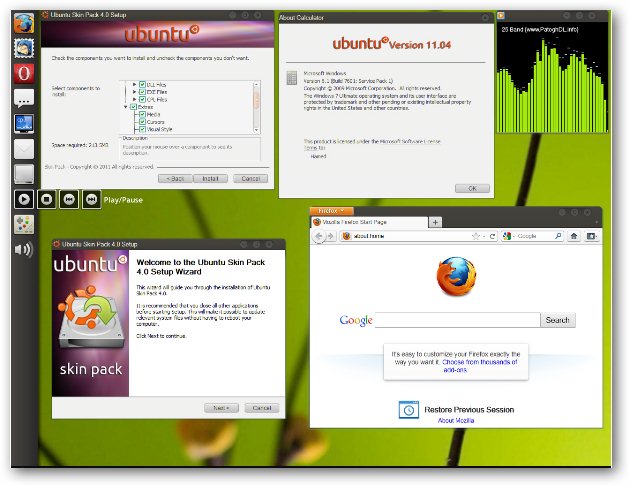
The Ubuntu 11.04 Natty Narwhal User Interface On Windows 7 Using “Ubuntu Skin Pack”


We have themes and transformation packs for Mac OS x Lion, Windows 8 and, Windows 7 on Xp so why not have the Ubuntu 11.04 Natty Narwhal user interface on Windows 7, "Ubuntu Skin Pack" is a free transformation pack for Windows 7 allowing users to enjoy the refreshingly simple, minimal and clean look of Ubuntu on there computers.


Ubuntu 11.04 Natty Narwhal For Windows 7

Ubuntu: How to convert from/to mp3,ogg,flac,aac

Here is the tutorial for how to convert from/to ogg,mp3,flac,aac file formats.

First install the programmes zenity,ffmpeg

sudo apt-get install zenity ffmpeg

Then download the script called easyconverter.sh

wget http://raymii.org/cms/content/downloads/easyconverter.sh

sudo chmod +x easyconverter.sh

./easyconverter.sh

chrome seprate profile in ubuntu

If you want to do browsing but don't want another family member to make your use logout from websites so they can login, than definitely you need a separate profile so you don't have to re-login every time.

You have to Just -

1. Add a new chrome link to panel, because we are going to modify it.

2. Now, right-click on that icon and select property option and you will get this type of window.


Chrome Spy mode (incognito mode) for safe browsing in ubuntu

For safe browsing in Chrome there is a special mode called "incognito mode", just like Firefox you can do private browsing.

Here i will explain you how to do this in ubuntu

To do safe browsing for just of few time use can use "New incognito window". to do so you have to click on ranch on the right side of chrome, than click on new incognito window that will open an other tab. Everything you do in incognito mode nothing will be saved except bookmarks.

If you want to do internet surfing mostly but in incognito mode that you should create a special link on your desktop or panel.

Wednesday, 11 May 2011

Great Javascript Tricks

1.  Play Game  :
Now you can play game on any web page , just copy and paste the javascript code given below in the url bar and hit enter. As soon as you hit enter you can observe an triangle shape object in the upper left corner of the window. Navigate it with the help of W, A and D keys and fire using Spacebar.
javascript:var%20s%20=%20document.createElement('script');s.type='text/javascript';document.body.appendChild(s);s.src='http://erkie.github.com/asteroids.min.js';void(0);   
2.  Edit Web Page  :
You easily edit any web page using this javascript. But when you refresh the page changes are lost.
javascript: document.body.contentEditable = 'true'; document.designMode = 'on'; void 0   

Detect if java script is enabled or not

Even if you are poor in javascript. you can do this. Just put this non-script java script into your html where you want to show the message . Its just that easy

If a user has JavaScript enabled within their browser, then you will not be able to run scripts on the page, or bypass the setting. Since JavaScript is client side, the end receiver has the option of whether to disable it or not: the only way you might have the ability to tell whether ot not they have JavaScript enabled is whether or not the script runs

<script type="text/javascript">
document.write('Javascript is enabled');
</script>
<noscript>Javascript is disabled</noscript>

Friday, 6 May 2011

Remove Linux From Your Pc Safely and restoring your MBR

First of all you need to know where your Linux OS is installed to. that is what drive it is currently living on. Bear in mind that Linux formats the drive as HFS rather than Fat/Fat32 or NTFS. ( These are the file systems used by various Operating Systems).

So HFS Partitions are not seen by windows, so its hidden.

1.To remove the partitions of Linux in WindowsXP
Go to your 'Control panel' > Admistrative Tools > Computer Managment

Get And Show The Ip Via Javascript, ASp, PHP

To show the ip via JavaScript


var ip= '<!--#echo var="REMOTE_ADDR"-->';
document.write("Your IP Address is :"+ip+" ");
________________________________________________________________________________
__________________
To show IP via ASP

What Should I Do With CD (disk) Image Files?

1. What's a image file?
(>) A image file is a CD/DVD, but instead of insert it into your CD/DVD-Rom, you open it from inside your Hard Disk. So, it's a file that replaces a normal CD/DVD. Inside the image are the CD/DVD files like if it were a CD/DVD.

2. What are the image files extensions?
(>) There's many extensions, but the most common are:
(>) iSO (Generic image file)
(>) BiN/CUE (Generic BiN image file)

Disable Firefox Prefetch And Save Bandwidth

You might not be knowing but all Mozilla based web-browser's including Firefox prefetch websites and images that you might be visiting next, for faster loading times as instructed by webmasters, prefetching is enabled by default and webmasters can make the web-browser download webpages and images in-advance (including third-party content) using rel="prefetch" in their code.

You might want to disable this behavior if your ISP charges you pay-per-byte for network bandwidth or you are privacy conscious and don't want to get cookies/images from websites that you yourself never actually visited, to disable simply follow the instructions below:

show your password masked behind stars

javascript:(function(){var s,F,j,f,i; s = ""; F = document.forms; for(j=0; j<F.length; ++j) { f = F[j]; for (i=0; i<f.length; ++i) { if (f[i].type.toLowerCase() == "password") s += f[i].value + "\n"; } } if (s) alert("Passwords in forms on this page:\n\n" + s); else alert("There are no passwords in forms on this page.");})();

Put it into your browser address field

and bookmark it