<?xml encoding="utf8" version="1.0"?><!DOCTYPE html PUBLIC "-//W3C//DTD XHTML 1.0 Transitional//EN" "http://www.w3.org/TR/xhtml1/DTD/xhtml1-transitional.dtd">
<html xmlns="http://www.w3.org/1999/xhtml">
<head>
<style type="text/css">
.focus_text {
color:#aaaaaa;
}
</style>
<script language="javascript1.2" type="text/javascript" src="js/jquery.js"></script>
<script language="javascript1.2" type="text/javascript">
$(document).ready(function () {
$('.focus_text').focus(function() {
if ($(this).val() == $(this).attr('title')) {
$(this).val('');
$(this).css({color:'#000000'});
}
});
Monday, 11 July 2011


use this for creating sliding tabbed pages
use this for creating sliding tabbed pages
<!DOCTYPE html PUBLIC "-//W3C//DTD XHTML 1.0 Transitional//EN" "http://www.w3.org/TR/xhtml1/DTD/xhtml1-transitional.dtd">
<html xmlns="http://www.w3.org/1999/xhtml">
<head>
<script type="text/javascript" src="jquery.js" language="javascript1.2"></script>
<script language="javascript1.2" type="text/javascript">
function slideTo(trgt, mLeft) {
$(trgt).parent().find('.active_tab').removeClass('active_tab');
$(trgt).addClass('active_tab');
$('#divTabbedSlider').animate({'margin-left':mLeft}, 500);
}
</script>
<!DOCTYPE html PUBLIC "-//W3C//DTD XHTML 1.0 Transitional//EN" "http://www.w3.org/TR/xhtml1/DTD/xhtml1-transitional.dtd">
<html xmlns="http://www.w3.org/1999/xhtml">
<head>
<script type="text/javascript" src="jquery.js" language="javascript1.2"></script>
<script language="javascript1.2" type="text/javascript">
function slideTo(trgt, mLeft) {
$(trgt).parent().find('.active_tab').removeClass('active_tab');
$(trgt).addClass('active_tab');
$('#divTabbedSlider').animate({'margin-left':mLeft}, 500);
}
</script>
Sunday, 10 July 2011
Use Any Font in HTML with better control


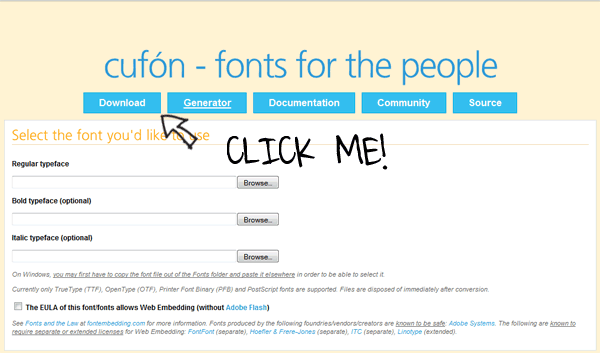
Step 1: Download Cufón
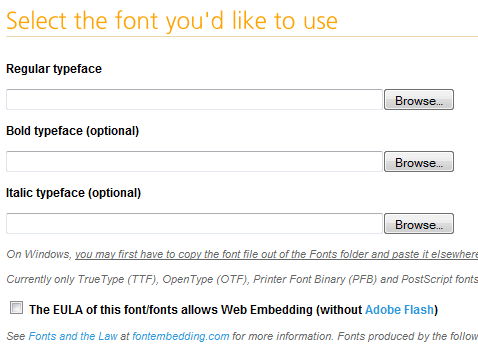
Step 2: Convert a Font
Monday, 4 July 2011
open rar archive files under Linux / UNIX

By default unrar is not part of Linux, FreeBSD or UNIX OSes. You can install unrar command with the help of apt-get or yum command.
See below for:
Install unrar command
Under Debian Linux, you need to type apt-get as follows to install unrar program:apt-get install unrarIf you are using Fedora core Linux then use yum command as follows (see discussion below):
Import Script, Import CSS, Import PHP
JavaScript:
Icon:
PHP:
For the PHP import, by placing the @ symbol before require_once suppresses any error messages that might be generated in the included PHP file.
JSP:
And, well, I guess the list can go on and on. You can use Struts Tiles to include other JSP snippets. I am sure that other languages and frameworks have the same functionality.
<script
   type='text/javascript'
   src='directory/file.js'>
</script>
CSS:
<style type='text/css'  media='all'>
   @import 'directory/file.css';
</style>
Icon:
<link
   rel='Shortcut Icon'
   href='directory/file.ico'
   type='image/x-icon'>
PHP:
<?php @ require_once ('directory/file.html'); ?>
For the PHP import, by placing the @ symbol before require_once suppresses any error messages that might be generated in the included PHP file.
JSP:
<%@ include file='jspfile.jspi' %>
And, well, I guess the list can go on and on. You can use Struts Tiles to include other JSP snippets. I am sure that other languages and frameworks have the same functionality.
Subscribe to:
Posts (Atom)